Recovering 4.1 GiB of RAM on NVIDIA DGX Spark
Wouldn't you like your KV pool to grow from 262,144 to 937,984 tokens—3.58× the capacity—with about 4 GiB more memory per host?
This post is wordy. If you want to get things done immediately, the code and compact README are here: https://github.com/emjotde/spark-ram-reclaim
DGX Spark has 128 GB of unified physical memory, but Linux exposes noticeably less than that.
There are two known ways to get a substantial part of it back. First, DGX Spark can run a 64 KiB kernel, which greatly reduces the amount of vmemmap metadata needed to describe physical memory (NVIDIA DGX OS documentation, Linux kernel documentation). Second, on a headless GB10, the 2,046 MiB display reservation can be reclaimed into ordinary Linux RAM (NVIDIA forum).
I am writing this because I haven’t found these two methods used together. The existing work I found covers either the 64 KiB kernel or reclaiming the display carveout. On my machines the first recovered 2.098 GiB, the second 2,046 MiB, for a combined 4.096 GiB of additional normal application memory per Spark.
| Change | MemTotal increase |
|---|---|
| 4 KiB → 64 KiB kernel | 2,200,016 KiB / 2.098 GiB |
Reclaim DISPLAY_FRM | 2,095,104 KiB / 2,046 MiB |
| Combined | 4,295,120 KiB / 4.096 GiB |
1. Switching to a 64 KiB kernel
Linux keeps a struct page for every physical page it manages. With 4 KiB pages on a 128 GB machine, that adds up to a surprisingly large amount of vmemmap metadata. Moving to 64 KiB pages reduces the number of base pages by 16x.
I installed NVIDIA’s official 64 KiB kernel and kept the existing 4 KiB kernel as a GRUB fallback:
sudo apt-get update
sudo apt-get install -y --no-install-recommends \
  linux-image-7.0.0-1019-nvidia-64k \
  linux-headers-7.0.0-1019-nvidia-64k \
  linux-modules-7.0.0-1019-nvidia-64k \
  linux-modules-nvidia-580-open-7.0.0-1019-nvidia-64k \
  linux-modules-nvidia-fs-7.0.0-1019-nvidia-64k \
  linux-tools-7.0.0-1019-nvidia-64k

sudo tee /etc/default/grub.d/99-64k-default.cfg >/dev/null <<'EOF'
GRUB_DEFAULT="Advanced options for DGX OS GNU/Linux>DGX OS GNU/Linux, with Linux 7.0.0-1019-nvidia-64k"
EOF

sudo tee /etc/default/grub.d/zz-dgx-spark-64k-thp.cfg >/dev/null <<'EOF'
GRUB_CMDLINE_LINUX_DEFAULT="$GRUB_CMDLINE_LINUX_DEFAULT transparent_hugepage=never"
EOF

sudo update-grub
sudo systemctl reboot
After reboot:
Kernel:       7.0.0-1019-nvidia-64k
Page size:    65,536 bytes
GPU driver:   580.178.04
Architecture: AArch64
The result:
4 KiB MemTotal:   about 125,370,544 KiB
64 KiB MemTotal:       127,570,560 KiB
Increase:                 2,200,016 KiB
That’s about 2.098 GiB recovered just from having less page metadata.
I kept the original kernel as a GRUB fallback and tested the new kernel with a 90 GiB CUDA allocation, RDMA between Sparks, all four ConnectX links, and normal NVIDIA telemetry.
The 64 KiB THP issue
The first boot had the expected higher MemTotal, but MemAvailable was surprisingly low:
Base page:       64 KiB
PMD/pageblock:   512 MiB
vm.min_free_kbytes: 6,358,528 KiB
Linux was keeping more than 6 GiB in free-memory watermarks for Transparent Huge Pages.
Setting:
transparent_hugepage=neverdropped that recommendation to roughly 45 MiB.
This doesn’t increase MemTotal; it just makes the recovered memory practically usable.
The resulting state can be checked with:
uname -r
getconf PAGE_SIZE
cat /sys/kernel/mm/transparent_hugepage/enabled
sysctl vm.min_free_kbytes
The expected values include 7.0.0-1019-nvidia-64k, 65536, [never], and
roughly 45500.
2. Reclaiming the display reservation
NVIDIA RM reports two adjacent firmware reservations on these GB10 systems:
| Reservation | Physical range | Size |
|---|---|---|
DISPLAY_FRM | [0x280200000, 0x300000000) | 2,046 MiB |
UEFI | [0x300000000, 0x303000000) | 48 MiB |
I leave the 48 MiB UEFI range alone.
DISPLAY_FRM, however, is 2,046 MiB reserved for display use on machines I run headless.
Firmware marks this range NOMAP, so Linux doesn’t normally put it into the direct map or buddy allocator. NVIDIA RM can also allocate scanout buffers from it. To turn it into ordinary RAM, the NVIDIA allocator therefore has to be disabled first.
Prior work
Emi Huang (coolbho3k) first demonstrated using the GB10 display reservation for CUDA:
That keeps the memory under DRM/NVIDIA ownership and makes it available to a CUDA-specific allocator.
jontaylor/gb10-ram-reclaim went further and returned the range to Linux as ordinary RAM. Its published target was:
Kernel:     6.17.0-1032-nvidia
Page size:  4 KiB
Driver:     580.173.02
I ported that approach to:
Kernel:     7.0.0-1019-nvidia-64k
Page size:  64 KiB
Driver:     580.178.04
BIOS:       5.36_0ACUM018
That is what allows the two memory gains to stack.
Disabling NVIDIA’s display allocator
The NVIDIA open kernel driver has two GB10 allocation paths for the scanout carveout:
memmgrAllocScanoutCarveoutRegionResources_GB10B
memmgrAllocFromScanoutCarveoutRegion_GB10B
The patched driver makes both return NV_ERR_NOT_SUPPORTED before allocating from the carveout and exports:
gb10_display_carveout_disabled()The reclaim module verifies that marker before releasing any pages.
Returning the pages to Linux
The display range is already inside memory blocks Linux knows about, so standard memory hotplug isn’t appropriate.
The reclaim helper instead checks the target PFNs, maps the range normally, verifies it with test patterns, clears MEMBLOCK_NOMAP, releases the pages with free_reserved_page(), and checks the exact totalram_pages increase.
The ARM64 mapping code needs several private kernel/MM functions:
init_mm
fixmap_lock
pgd_pgtable_alloc_init_mm
__create_pgd_mapping_locked
unmap_hotplug_range
free_empty_tables
memblock_clear_nomap
memblock_mark_nomap
These are resolved using Linux livepatch ELF relocations.
The implementation details are in the
spark-ram-reclaim README.
Reclaiming it in stages
I split the range into three stages:
| Stage | Size |
|---|---|
| Probe | 2 MiB |
| Left | 1,022 MiB |
| Right | 1,022 MiB |
The 2 MiB probe is first mapped, written, checked and unmapped without releasing it.
I then release those 2 MiB and verify that MemTotal increases by exactly 2,048 KiB. The two 1,022 MiB halves are released separately after that.
Running the reclaim
Install the build tools, clone the repository, and build on the Spark:
sudo apt-get install -y git make gcc-13 python3 openssl mokutil kmod psmisc
git clone https://github.com/emjotde/spark-ram-reclaim.git
cd spark-ram-reclaim
make test
sudo make preflight
make build
The build also uses /usr/local/cuda/bin/nvcc from the CUDA toolkit included
with DGX OS.
Create a module-signing key and queue it for MOK enrollment:
sudo make key
sudo mokutil --import /root/.local/share/gb10-ram-reclaim/keys/module.der
sudo systemctl reboot
MOK enrollment happens before Linux and SSH start. Connect a monitor and
keyboard before rebooting. mokutil asks you to create and confirm a
temporary password. On the next boot, use the keyboard to select:
Enroll MOK -> Continue -> Yes -> enter the temporary password -> Reboot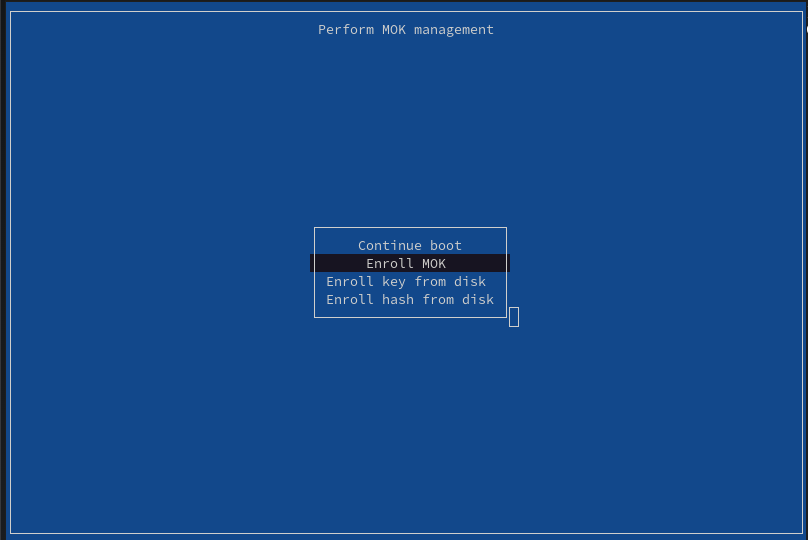
Screenshot from the Piraeus Operator documentation, Apache-2.0 license.

After Linux starts, verify the enrolled key and sign the modules:
sudo mokutil --test-key /root/.local/share/gb10-ram-reclaim/keys/module.der
sudo make preflight
sudo make sign
Make the GPU idle, then run:
./spark-reclaim status
./spark-reclaim reclaim --dry-run
sudo ./spark-reclaim reclaim
Success ends with:
Reclaimed 2095104 kB. MemTotal=... kB.The guarded driver and reclaim modules remain loaded for the rest of the boot. Reboot restores the stock driver and display reservation.
Does Linux actually use it?
I also wanted to verify that this wasn’t merely an accounting change.
The validator allocates normal host memory, faults it in, registers it with CUDA, reads /proc/self/pagemap, identifies pages from the reclaimed physical range, modifies them on the GPU, and verifies the results on the CPU.
Results on two machines:
| Observation | Spark 1 | Spark 2 |
|---|---|---|
| Display reclaim added | 2,046 MiB | 2,046 MiB |
| Validation allocation | 16 GiB | 16 GiB |
| Reclaimed pages exercised | 32,639 | 32,684 |
| Reclaimed memory covered | 2,039.94 MiB | 2,042.75 MiB |
So essentially the whole reclaimed range appeared naturally in ordinary Linux allocations and could be accessed through CUDA.
Headless desktop
I also tested my usual Sunshine setup after reclaiming the display memory.
An isolated GNOME session using the Xorg dummy driver works, and Sunshine can capture it while NVIDIA core/UVM still provide NVENC. H.264, HEVC and AV1 all initialized normally, and CUDA continued to use reclaimed pages.
An NVIDIA-primary Xorg setup doesn’t work because it wants to allocate its primary framebuffer from the scanout carveout that has just been disabled.
For a headless Spark, dummy Xorg plus Sunshine is enough.
Result
The numbers are:
- 2.098 GiB from the 64 KiB kernel.
- 2,046 MiB from the unused display carveout.
- 4.096 GiB total per Spark.
The practical payoff is substantial. On my 2× DGX Spark setup, recovering 4.096 GiB per Spark gives me about 8.2 GiB of additional usable memory across the pair. With GLM-5.3-Flash, that was enough to grow the KV pool from 262,144 to 937,984 tokens—about 3.58×.
My final MemTotal is:
131,893,888 KiBPretty close to getting the full advertised 128 GiB into Linux.
Gotcha: I reserved another 2.125 GiB myself
This one was self-inflicted. I had enabled kdump while investigating unexplained Spark hard power-offs. Its crashkernel=2G setting held back 2 GiB high plus 128 MiB low so a second kernel could save a crash dump after a panic.
Disabling kdump recovered the full 2.125 GiB. This is separate from the 64 KiB kernel and display reclaim, so it is not included in the 4.096 GiB result above.
My full progression was:
| Configuration | MemTotal |
|---|---|
| 4 KiB kernel, crash kernel present | ~125,370,544 KiB / 119.56 GiB |
| 64 KiB kernel, crash kernel present | 127,570,560 KiB / 121.66 GiB |
| 64 KiB kernel, crash kernel removed | 129,798,784 KiB / 123.79 GiB |
| + display reclaim | 131,893,888 KiB / 125.78 GiB |